
A loop station inside Ableton.
Five loopers in one window, played with the MIDI gear and mic you already own. Stack audio on audio on audio, overdub to the nth degree, and somewhere in the layers a track starts to happen. One click saves every loop to clips.
More fun on hardware. More productive in Ableton. Pick both.
Every gear forum has the same confession: the fun machine and the productive one are different machines. The best jams happen on the fun one, and most of them never get recorded. Ouroboros is the fun machine built inside the productive one. A session looks like this:
Hit record, play a phrase.
It comes back around. Looper 1 can set your tempo; everything after syncs to it automatically.
Stack audio on audio on audio.
Overdub to the nth degree — five loopers, all in view at once, every layer still playing while you add the next small element.
FX under your fingers.
16 effects across input, tracks and output. Reverse a loop, resample it, or let the feedback dial mutate it while it spins.
The jam doesn't escape.
One click saves every loop to clips. And the session recorder was rolling the whole time anyway — even through stops and clears.
I wanted to loop like Marc Rebillet. I already owned everything except the loop station.
Ableton, a mic, MIDI controllers on the desk. I didn't feel like spending $500 on an RC-505 just to get big loopers I could actually see.
So I opened Max for Live and started building. Ouroboros wraps Ableton's own Looper devices, FX and instruments into one rack, with one HUD that runs all of it: five loopers on screen at the same time, which ones are active, what state they're in, FX under your fingers. If I'm honest it's been through over a hundred iterations. I'd play it for a night, hit the thing that annoyed me, fix that, and play again. For about two years.
These days my favorite thing is having friends over and just looping together. It's fun to be free of the production side and not worry about getting everything perfect, and it's pulled out ideas that never would have existed otherwise. It's just as fun alone. Some nights it turns into a track. Most nights the jam was the point.
Watch it loop.
Watch a track come together in one take.
What's inside
A full performance instrument, shipped as one Ableton Pack.
5 Parallel Loopers
Rec, overdub, play, stop, hold-to-clear. Undo/redo, reverse, half/double speed and length, quick stop, per-looper quantization, and a 3-band post-recording EQ on every loop.
The Feedback Dial
0–100% sets how much of the loop imprints on each overdub. 100% stacks forever; 0% replaces the loop in real time while it plays; anywhere between lets it slowly evolve. Adjustable on the fly.
16 FX × 3 Stages
The same 16-effect bank runs three times: on the input, the tracks, and the master output. Each stage comes with its own dry/wet knob and kill switch, plus an All-FX-Off panic button and resampling through the output chain.
Loop-Length Sync
Lock loopers 2–5 to 1×, 2×, 4× or 8× of looper 1 with automatic recording stop, or set them free with ∞.
One-Click Save
All five loops save as clips across five tracks in a single scene. Auto-finds the next empty row. No dragging, no hunting.
Session Recorder
Capture the entire performance straight to an audio file on disk, independent of Ableton's transport. Never lose a jam again.
Instrument Selector
Scan a hundred-plus sounds by category, randomize, and swap instruments mid-performance without leaving the HUD. Ships with a customizable rack.
16 External Inputs
Mics, synths, hardware: toggle each input in and out of the loopers on the fly, each with independent gain.
Strict MIDI Learn + Low Latency
Per-channel MIDI mapping that never detaches mid-set, FX racks that auto-bypass at zero, and a reduce-latency mode for the tightest possible loops.
The 16-FX bank × 3
These 16 effects load three times over: one bank on the input, one on the tracks, one on the master output. Each stage has its own dry/wet knob to set how hard the effects hit the final mix, and every slot is a standard Ableton device you can swap for anything you like.
One HUD. The whole show.
A floating performance window that sits on top of Ableton. Every loop state, effect and input visible at once. Tap the screenshot to zoom.
Hand-built in Max for Live, and it looks like it. Every control stays on screen while you play. No menus.
 1
2
3
4
5
1
2
3
4
5
Hear it loop.
Two unedited art-jam sessions, looped live with Ouroboros. No post-production.
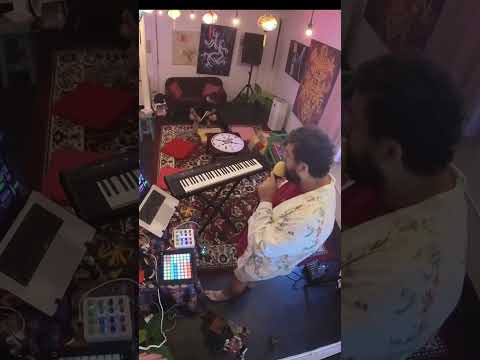
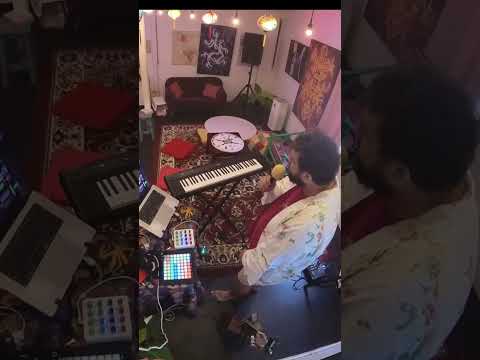
More sessions on the YouTube channel →
This isn't for everyone. That's kind of the point.
Everyone has their own way of making music in Ableton. If you love your workflow and don't want to change it, great. Genuinely: don't change it.
But here's what I noticed. Everyone mentions the Looper device. Almost nobody performs with it. I bought a whole course on looping and live performance, and the Looper video was pure theory: you "could" use it, you "could" chain two together. It wasn't the method they actually used for anything.
Live looping inside Ableton is genuinely underdeveloped territory. Ouroboros is my attempt to make it feel like an instrument. If that sounds like fun, come play.
Skip it if
- You love your current workflow and it's already making music you're proud of
- Your loops live in session clips and you like crafting them there
- You want grid-perfect, quantized results every time
Come play if
- You want to stack audio live and keep what happens
- You've watched loop artists build songs from nothing and wanted in
- You'd rather spend tonight playing than arranging
- You built your own looper template once — and want the nights where it's already built
- You've got friends who'd pass the mic around if the loops just worked
Get Ouroboros ∞
Why $27? It's the beta price, and it goes up at v1. Early loopers get in cheapest, shape the roadmap, and keep every update — lifetime upgrades included.
- Lifetime upgrades: every future version, free, forever
- Ouroboros Ableton Pack: one-click install (File → Install Pack)
- The HUD: the floating performance window that runs everything
- 5 pre-routed parallel loopers with full transport control
- 16-FX bank × 3: input, track and output stages, each with its own dry/wet
- Customizable instrument rack + live instrument selector
- 16 external input senders for mics and hardware
- Session recorder: capture whole jams to disk
- Setup walkthrough video
If Ouroboros doesn't change how you loop in Ableton, email [email protected] for a full refund. No questions asked. I built this because nothing else existed. If it doesn't work for you, I don't want your money.
Questions, answered.
Doesn't Ableton already have a Looper?
Yes, and it's good. Ouroboros actually builds on it, which is how loops auto-sync to your global tempo. What Ableton doesn't give you is five loopers you can see and control at once: racks show one device at a time, and floating windows disappear when you click away. Ouroboros is the missing window.
Can't I just loop with Session View clips?
You can, and people make great music that way. It's a different activity: session looping is crafting — edit, quantize, refine. Ouroboros is for performing — audio stacked on audio in real time, kept as you play it, like a loop station. Plenty of people do both.
Does it quantize my audio?
Loop lengths sync to your tempo automatically (looper 1 can set the tempo), and a reduce-latency mode keeps tracking tight. Timing within a loop is yours: like a hardware looper, it records what you play, when you play it. Undo/redo steps back and forward through your overdub layers whenever you want. With a little practice you get tight, and that's the fun.
Can I replace part of a loop while it plays?
Yes — the feedback dial. 0–100% sets how much of the original loop imprints onto each overdub: at 100% layers stack forever, at 0% your new take fully replaces the old one in real time, and anywhere between lets the loop slowly evolve. It's adjustable on the fly.
Does it run on Push 3 Standalone?
Not tested yet — Ouroboros is built and tested in Live 12 on the desktop. If you run Push Standalone and want to try it, email [email protected] and we'll find out together.
Which versions of Ableton does it work with?
Ableton Live 12: either Suite (Max for Live included) or Standard with the Max for Live add-on. Intro doesn't support Max for Live, so it won't work there.
Mac or Windows?
Built and tested on macOS. Windows should work but is untested so far. If you hit a bug, email [email protected] and I'll fix it or refund you, your choice.
How does it install?
It ships as an Ableton Pack. In Live: File → Install Pack, select the download, done. The included walkthrough video covers first-time setup in a few minutes.
Do I need a MIDI controller?
No. Everything works from the HUD with a mouse or trackpad. If you have a controller, the built-in strict MIDI Learn maps any knob, encoder or pad per channel, and unlike Ableton's native mapping it doesn't detach mid-set.
Can I use my own instruments and plugins?
Yes. The instrument rack is yours to fill: drop in any Live instruments or VSTs and the selector scans them by category. Around a hundred sounds stays snappy on a modern machine.
Can I loop external gear or a microphone?
Yes: 16 external input senders let you toggle mics, synths and hardware in and out of the loopers, each with its own gain.
What about latency?
There's a dedicated reduce-latency mode that bypasses FX chains during initial recording, and every FX rack auto-bypasses when it's at zero. This is the thing that makes software looping viable live.
How do I get the files?
Instant download after purchase.
Can I use it in my shows and releases?
Yes: unlimited personal and commercial use: perform with it, stream with it, and release music made with it, no attribution needed. The only thing you can't do is resell, share or redistribute the template and devices themselves.
What's the refund policy?
30 days, full refund, no questions asked. Email [email protected]. If it doesn't change how you loop, I don't want your money.
The middle is always a mess. Then something magical starts to happen.
Stack audio on audio, overdub to the nth degree, keep adding the small elements. Get some of that for yourself.